Huzzah! I finally fixed the E18 error I’ve been experiencing on my Canon PowerShot SD450, which prevented my lens from extending when the power was turned on, and the fix wasn’t nearly as difficult as I had expected. I’ve even snapped some shots of the process so that you can follow along at home, and fix your own camera if you are experiencing the same problem that I was.
 If you’re not yet familiar with the E18 error, check out this information on the topic from Wikipedia:
The E18 error is an error message on Canon digital cameras. The E18 error occurs when anything prevents the zoom lens from properly extending or retracting.[1] The error has become notorious in the Canon user community as it can completely disable the camera, requiring expensive repairs.
This is a fairly prevalent problem with the PowerShot cameras, and a class action lawsuit was filed (but dismissed) against Canon:
A Chicago law firm, Horwitz, Horwitz & Associates, has already filed a class action,[4] while the law firm of Girard Gibbs & De Bartolomeo LLP are investigating this camera flaw and may issue a class-action lawsuit against Canon.[5] There is at least one other.[6] Although the suit was dismissed in a court of law, the plaintiffs are appealing.
Fortunately, at least in my case, the fix did not require returning the camera to a Canon repair facility or having to take unreasonably complex steps.
My solution for the PowerShot SD450/IXUS 55 follows:
(You’ll need a very small Philips head screwdriver, #00, to remove the screws)
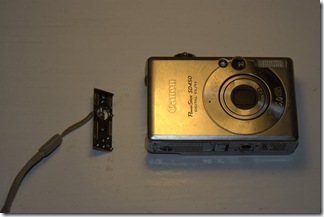
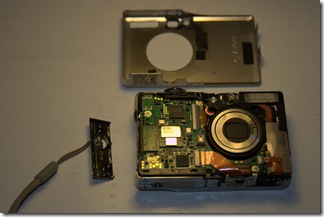
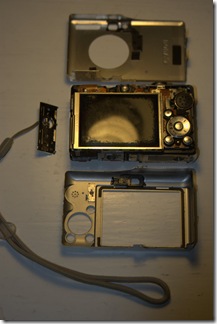
- There are six screws holding the metal frame of the camera body together, two on each side, and two on the bottom. Remove all screws, pop the strap-hook plate (sorry, probably not the most technical term there), then gently lift the front plate off by pulling up from the bottom, and remove the back plate in the same fashion. These should come off relatively easily. This is what the camera should look like as you remove the plates:
- Now, looking from the top of the camera, you should see a small motor on the left side, as shown below (it’s beneath the cable with a “22” written on it):
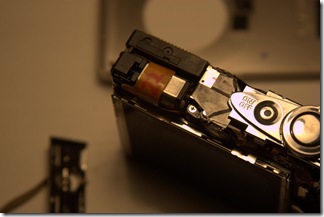
- Take your screwdriver (or another small instrument) and gently try to rotate the plastic piece attached to the motor on the left side, as shown below:
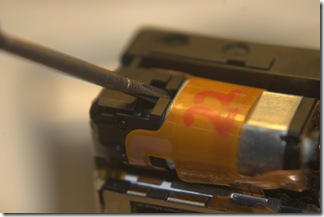
- At this point, try placing the battery back in the camera (if you have removed it), turn the camera to one of the capture modes, and press the power button. If all went well, your lens should now be able to extend and retract properly.


Further information (and other repair tutorials) are available at the following locations:
- Canon PowerShot A70 Error E18 Fix (Translated from Bulgarian)
- Canon E18 repair guide for SD300 [PDF]
- CNET: Digital cameras: Fixed my SD450 e18 error
- Canon and the E18 Error / Lens Error, Restart Camera
- Canon E18 Error Dialog
- Canon E18 Error: Repair Instructions
- E18 Error
- E18 – Repair Guide part 1
Unforunately, the site that had the most comprehensive information about this issue, e18error.com, seems to be down for the time being. Here’s a quote from their site that I saved in another blog post before the site was taken down:
HOW IT ALL WORKS:
Canon E18 error happens when the lens gets stuck while trying to extend. The camera will beep a few times and the LCD will display a little E18 in the lower-left corner. The lens gets stuck in the extended position, and refuses to move either to focus the lens or to retract when powered off.Apparently, people who posted about this incident on forums say they had to send the camera for repair and that Canon has horrible customer support and response time.
Here is how the E18 error looks like. You just get a black screen with small “E18″ sign in the lower-left corner:
The problem usually happens because dirt or sand get into the lens mechanism. But it seems that more and more people are showing, who took great care of their camera, and still started receiving E18 errors.
Please share your experiences with this fix, or the E18 error in general, in the comments below. Thanks for reading!

 Williamo's Blog
Perfect directions… Thanks! Worked perfectly and took about 10 minutes.
Two things I picked up in doing so: First, it took a can of compressed air to clean out whatever was sticking the motor (manually moving it wasn’t enough). Second is to make sure you line up the switch that toggels between photo mode and picture review mode before you put everything back together.
Thanks to all for perfect instructions and comments!
you da man. perfect. 10 minutes max.
Genius ! This works !
I’m a 30 year old female who is distinctly un-techy to the extreme, and I have never attempted to take anything remotely technical apart in my life.
But it worked, easily ! I’m thrilled ! 🙂
WORKED!
I had an old IXUS 60 sitting on my shelf for a long time, before deciding to look into if I could do something about it. Tried advice from a different of sites (hitting/pushing/twisting the lens gentle, etc) — but this was the only solution that worked in the end! I still have some grinding noise from the servo, but the camera works! Thanks a lot & Merry Xmas!
Unfortunately that did not work for me, but after putting the camera up together I did the following and the problem was fixed. I guess the steps bellow can be tried before disassembling the camera:
1) Turn on the camera, hopefully the telescope will come out.
2) Hold the telescope with your fingers
3) Turn off the camera and while the telescope is trying to retract gently try to rotate it to the right and then to the left, at the same time make some resistance to the retracting telescope, you might hear a click.
4) Release the telescope
5) Turn on the camera, it should work now.
Worked flawlessly. My roommate gave the camera to me b/c he couldn’t fix it. After 10 minutes I fixed the problem and now have a new camera.
As mentioned above, definately make sure to line up the switch that controls the camera mode before putting the screws back in. I learned this lesson the hard way.
Thanks for the fix!
I looked at a number of illustrated guides, including one I couldn’t find again that had a full strip down of a similar model to get at the telescopic lens assembly. Well, that might be a more complete solution, but I don’t think I would ever have got the whole thing together again. As it was I stripped mine more than necessary and have one tiny surplus screw to show for it. Your tip for just removing the case, nudging the motor and retrying with the battery worked fine, it took a couple of goes before it would do so without some grinding noises. Back together and I’m happy, especially since I’m flying to Malta in less than 24 hours and had only just discovered the camera wasn’t working. Thanks a million!
Thanks! I had the same problem and followed your instructions and it fixed everything! After reading about the poor service from Canon and the thought of paying $150 for repair this was a super cool treat. It took me about 20-30 minutes and problem was solved!
THANKS! This is what the internet is all about! I fixed it! Yaaa! My one comment is to be VERY CAREFUL putting it back together. There are many little tabs to line up (I screwed up a few times). Also be sure to LINE UP THE SWITCH that changes camera modes. My first try had the switch not properly lined up and it obviously wouldn’t work. I finally got it 3rd try. Anyway, the camera works! Thanks.
I have the same problem with a Powershot A85 bought in 2004: can anybody tell me if it works with such models, too?
Thanks a lot
Elena
@Elena: I’m pretty sure that it should work; the screws might be in
different places, but the lens drive motor placement should be the same. If
it does work for you, please leave a comment here telling your story.
Thanks! =)
Thanks my camera is working again… I followed the same steps and modified them slightly to do the same thing for The IXUS 80 IS which has another step or two in the process.
Here is a link to the fix.
http://canonixus80lensfix.blogspot.com/
Simon
Thanks a lot, your instructions worked perfectly with my A410 (bought in 2006 and E18 errored two weeks after purchase). you saved my holidays!
Thanks for the information and pictures. It worked. I fixed my roommate’s E18 problem. I disassembled the camera and managed to get the lens closed using a small flathead screwdriver to turn the gears on the outer edge of the camera just below the motor in the pic. I had to turn the camera on and off several times for the lens to reset, but I got it to work.
Thanks
Bob
Well done! You allowed me to save a little money and delay the inevitable for a little bit longer. PLUS – I feel like the “man” for having done this myself.
Hi – Thanks for the great tutorial. I did exactly what you said and it worked. BUT, I think I may have scratched the lens in the process b/c now all my pictures are coming out completely blurry. Any recommendations?
@Eddie D.
I do recall hearing about this symptom (blurry images before/after E18 error) on another website, but I haven’t experienced this problem myself. From what I recall, however, the blurriness is due to the lens being out of sync with the gear which causes a focusing problem for the sensor. You may be able to remedy this problem by slightly twisting the barrel of the lens while fully extended (max. zoom) until you hear a click.
Let me know if that works, I’d love to collect more information about further fixes for this issue!
Thank you! I can believe this worked. I love this camera and did not want to give it up. I took this camera apart and put it back together, not knowing what to do. I fund this site with photos, and now I am up and running again…….Thanks One Million.
Was ist das?
Thanks for the great advice. Had tried other methods but yours worked perfectly. Camera hasn’t worked for a couple of weeks and now my wife is happy she can take photos and videos of the kids again. Also good advice regarding lining up the camera/video/playback switch when reassembling
=*( [tear]
Unfortunately all the instructions and other people’s comments did not save my camera. i guess because instead of my lens being unable to extend like yours, mines wouldnt retract.
I followed your instructions and took my camera apart. Rotated the thing by the motor, used the compressed air tip, even held the lens and twisted it. NOTHING. The best i would get was that the lens would retract but not completly then extend back out and stay out, displaying the e18. I guess this works only if your lens WONT EXTEND….
same thing with mine 😦
Thank you so much! worked great…my camera is an SD450 and it had an 8 on it by the motor instead of a 22 but it worked fine!
MANY THANKS!
Works perfect for my Ixus55 camera….
No more “E18” on display; now showing perfect photo’s again!
Great instructions. Worked like a charm.
Thanks. Isnt the internet wonderful!
The combination of this and the http://www.e18error.com/repair.html were helpful and hope to not have to replace Canon SD450! Turning the lens quite a few times with a lot of force solved my problem for now! Thanks much!!
You rock! I fixed my camera using your directions and it worked perfectly!
THANK YOU FOR THIS SITE!!! – it helped me so much.
I am on the road with my family for a big reunion and shockingly ended up as the only one with a camera. I love my Power Shot and never had any problem with it, but last night got the E18 error message and couldn’t take any pictures. Thanks to this site, and my pocket swiss army knife, I was able to fix my camera at the hotel and be ready for the second day of the reunion without having to buy a new camera.
The only thing I would add to the instructions, and it may have been covered in another post (I didn’t read them all), is to make sure the function button is in the right position to engage the sliding tab it is supposed to move when attaqching the back cover plate. I had to take the camera apart a second time because I didn’t realize this.
Many many thanks again!!
cool man you saved the day!! thank you
Your steps worked like a charm! It was as simple and easy as you described. Thanks for all your help!
Thanks – all fixed!!
It works! Didn’t work the first, second or third time but just kept at it until it was opening and closing. Can of air is great advice as well. Still grinds some when opening but I do know I had to have some dirt in there as we take it 4-wheeling. Will try to keep it covered better from now on.
It took me 20 minutes to figure out there was something to turn in the hole at the end of the mootor. When I poked about with the screw driver and voila it was fixed. Great job. I have a camera again
My Canon SD450 camera lens jammed in the extended position with the E18 error. I could close it but it would fault and re-extend immediately. I could get the lens to stay in by powering off and holding the lens retracted.
If this is your problem, I have another step to add right after checking the lens function with the battery in and the case off.
-Watch the position sensor while you extend the lens. The position sensor is the little black dodad attached directly to the motor. If the camera makes noise after this dodad stops turning, then you have a problem with the focus motor gears.
With some patience these gears can be revealed by removing the LCD and the lens assembly from the plate that sits in front of the LCD. You will need to remove a small plate on the back of the lens assembly to look at the gears where you are likely to find a bit of sand or other junk.
It took several hours and some good organization with the screws as there are several types.
Use a 0 Phillips and have alcohol wipes handy along with canned air.
Good luck. Great camera is now back in action.
hey does anyone know if this will work if the lens has had sand or dirt in the lens and then it errors and somebody pushed it in until the whole lens is loose?
Excellent instructions! I followed the instructions exactly and it worked thanks so Much !!!!!!!!
Sadly this didn’t work for me =(, I honestly love this camera and I was really hopping this to work for me and to fix it with out having to pay 100 dll minimum Im sad, congrats to all the people that fixed theirs.
Занятный пост, очень интересно было почитать
Perfect instructions. It worked like a charm. Thanks.
Nisheedh
These were perfect directions and worked a charm!!! Can’t thank you enough!
THANK YOU!!!!!!! Awesome you’ve helped so many people when Canon wouldn’t.
Thanks again for posting these instructions.
I dropped my camera and the lens stayed extended and the e18 message came up. I googled the problem and saw your fix. Sounded great and I am trying it right now….but it isn’t working. I’ve tried the other suggestions as well. I’m thinking that by dropping it something else became loose or was damaged. Anyone else out there have any suggestions on what I can do?
thanks much!
step by step instructions for resolving E18 error. The screen shots you have mentioned is very helpful to understand which part is where located and what to do. Keep it continue.
Anyone know what size/type screwdriver I need to get into my Canon Power Shot A430?
I bought Phillips 00 & 0 and they’re too big.
Thanks
Thanks. It worked great. Good job with instructions and pictures. Its great to see people trying to help others with there experiences .
Thanks again. JOE
Thanks so much it worked on my CANON Ixus 80is! I used a combo of this and the instructions at: http://www.avh.dds.nl/Fix-Canon-SD600-Lens-Error,
http://www.bomaus.net/index.php?option=com_content&view=article&id=54%3Acanon-ixus-70-lens-error&catid=12%3Aprojects&Itemid=29, and
http://camerarepair.blogspot.com/2007/12/fixing-lens-error-on-digital-camera.html
helped to fix the problem! All these sites are also recommended.
I took it all apart as per instructions and used combo of paperclip, vacuum cleaner and air compressor nozzle to get rid of any dirt/dust regularly during the operation, switching it off an on while compressing was most effective. We also used sharp screw drive to scrape dirt out of gear cogs, turning a bit, scraping then blasting, until al it ran smoothly. Before this is wasnt turning at all. Thanks so much!!!
i had a problem with my s3 1s. the lens stayed open and would not retract. no, i did not drop it or anything. i did find a repair place in texas called cameraandparts,com that did a fine job at fixing the problem. anyone out there should give ‘em a try!
worked brilliantly. Agree with comment re lining up toggle for picture mode. I had everything almost back together and then realised this switch was not working. Simply pulled it all aprt again lined it up and all good. Thanks for posting this fix
THANK YOU SOO MUCH!!!!!!!!!!!!!!!!!!!!!! It worked perfectly, and before I put it together, I read through all the comments and figured out how to line up the little thingies in order to put it back together properly. I am only twelve, and it worked great. 🙂 Thank u sooo much.
Fixed my friends Cannon SD630 with these directions!
Awesome info! Thank you sooooooo much!
Thank you very much
worked great
April 2nd 2011
Thanks!!! Quick easy fix with your directions!!! Canon SD450
I do have the E18 showing up from time to time when using this camera, and this time it happen again at a football game. So, I put it away and this morning its back working..strange, but true. Now, my question is when I do this operation you have shown here-Will this E18 disappear altogether?
Totally worked. Thanks!
Worked Great. Exactly what it needed. I was ready to toss it.
De pronto el famoso E-18.
He seguido los pasos que bien indican en las fotografías y mi canon ixux 55 a vuelto a funcionar !!!
MIL GRACIAS !!!
Your awesome! Worked like a charm; thanks for taking the time to post this!
Ditto to all the comments singing your praises for sharing this fix. It not only worked perfectly but gave me renewed faith in my fellow humans!
Thanks so much for your help! I really appreciate the time you put into blogging your experience.
Thank God for Google and for Williamo – solved my E18 problem in a jiffy just adding compressed air in a can 🙂
Perfect fix. Thank you. I was pricing new cameras and came across this info.
Fantastic! IXUS 60 back together…a bit clunky at first, noisy and grinding; after brushing out the gears at the side with a tiny brush, lens is running smooth. But one small thing…notably a bit of clear, soft rubber about 5mm across with an oval hole in it…left over maybe from the camera or possibly from any number of items that get taken apart on my desk from time to time…anyway not too much of a bother, camera works and I’m chuffed to bits!
thank you very much for this excellent, clear guide. You have rex=scued our holiday and made my day!!!!